

WELCOME TO THE DON SALADINO APP
Thank you for downloading the app! The easiest way to find your way around is with two menus: the sidebar and the footer.
SIDEBAR: Tap the three lines in the upper left corner, or swipe right on most screens, to open the sidebar. It's home to your Program Library, the Exercise Library with a video for every movement, your Performance stats, Settings (where you can switch to kilograms), Contact Us, the How to Use the App video, and my Thorne supplement store, with 15% off every order.
FOOTER: These four tabs at the bottom of your screen take you everywhere else:
Home: view and start your scheduled workouts
Programs: every program in your membership, plus any Quarterly Challenge you register for
Resources: guides, eBooks, and recipes
Leaderboards: a fun way to gamify the app
Before you get started, take a few minutes to watch the How to Use the App video and read the How to Use the App guide. You'll find both inside the app, and they'll help you get the most out of every workout.
If you ever need technical support, email us at support@donsaladino.com and we'll be happy to help.
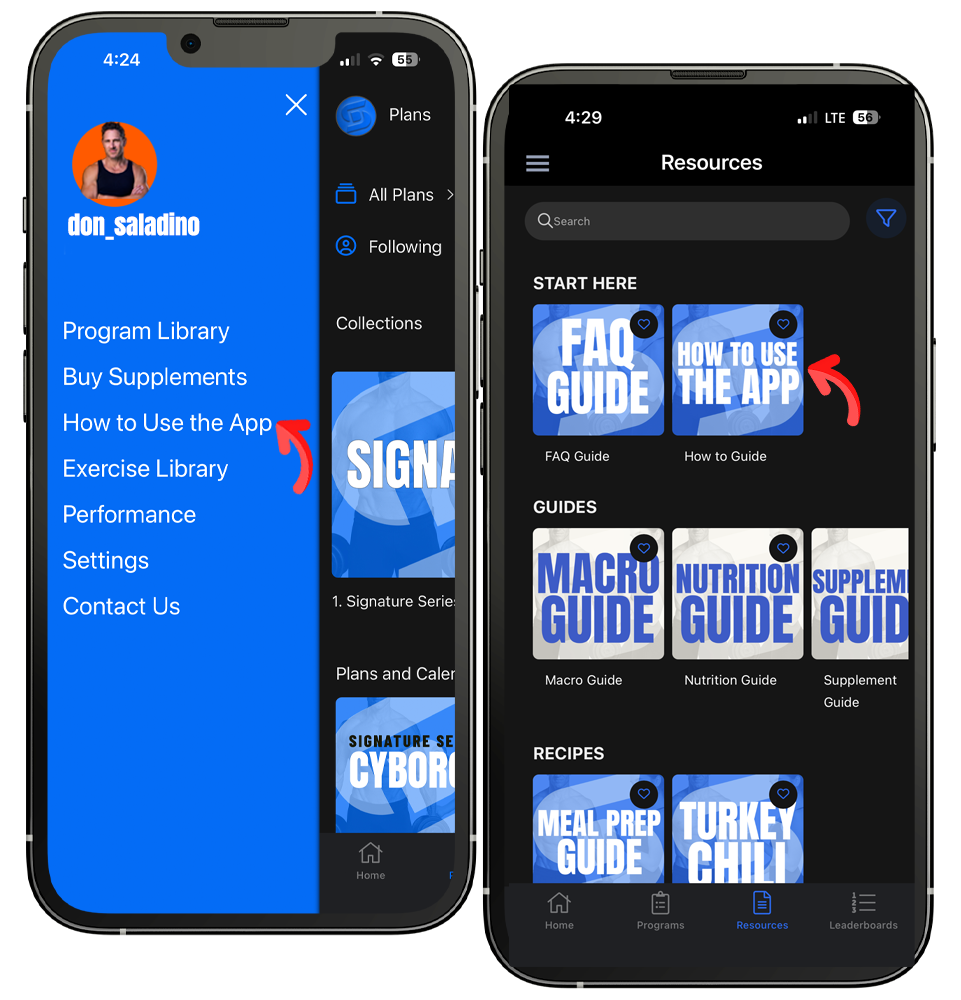
Find the How to Use the App video in the sidebar (left) and the How to Use the App guide under Resources (right).