HOW TO USE THE DON SALADINO APP
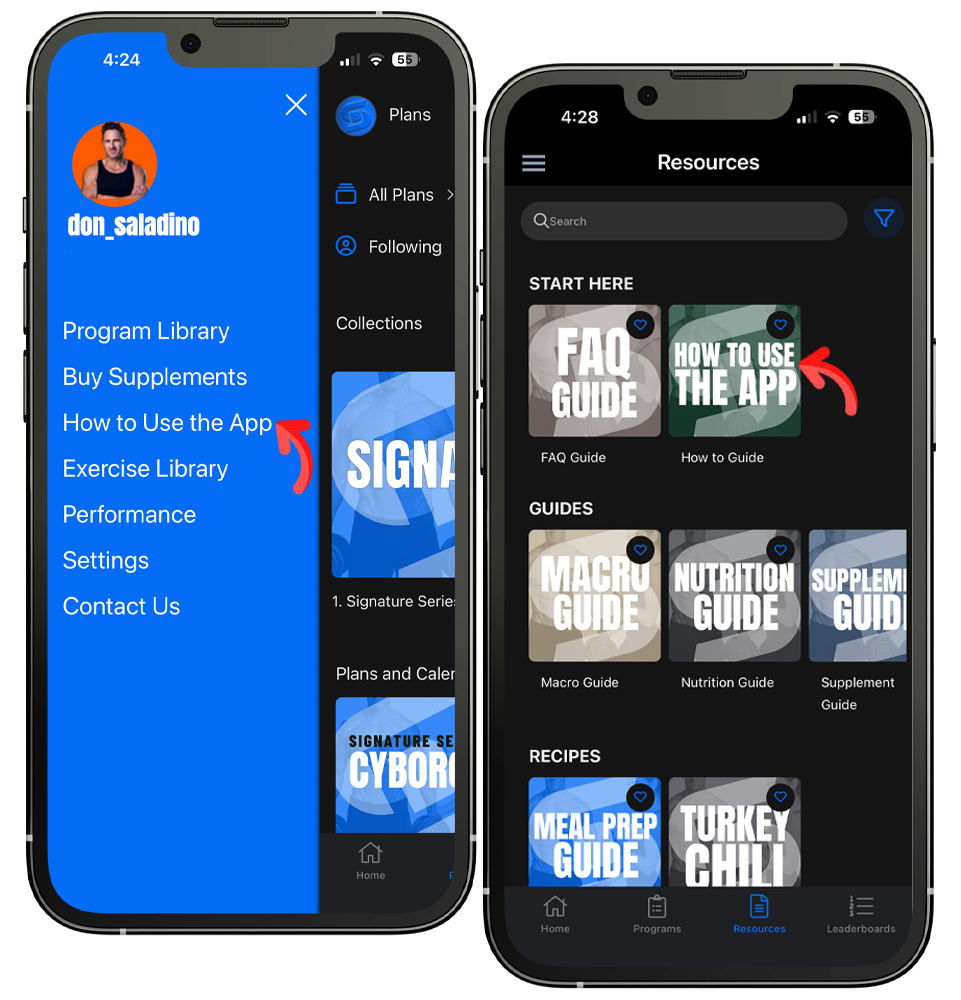
To get familiar with the app, check out the How to Use the App video in the sidebar and the How to Use the App guide in the Resources section, located in the footer.
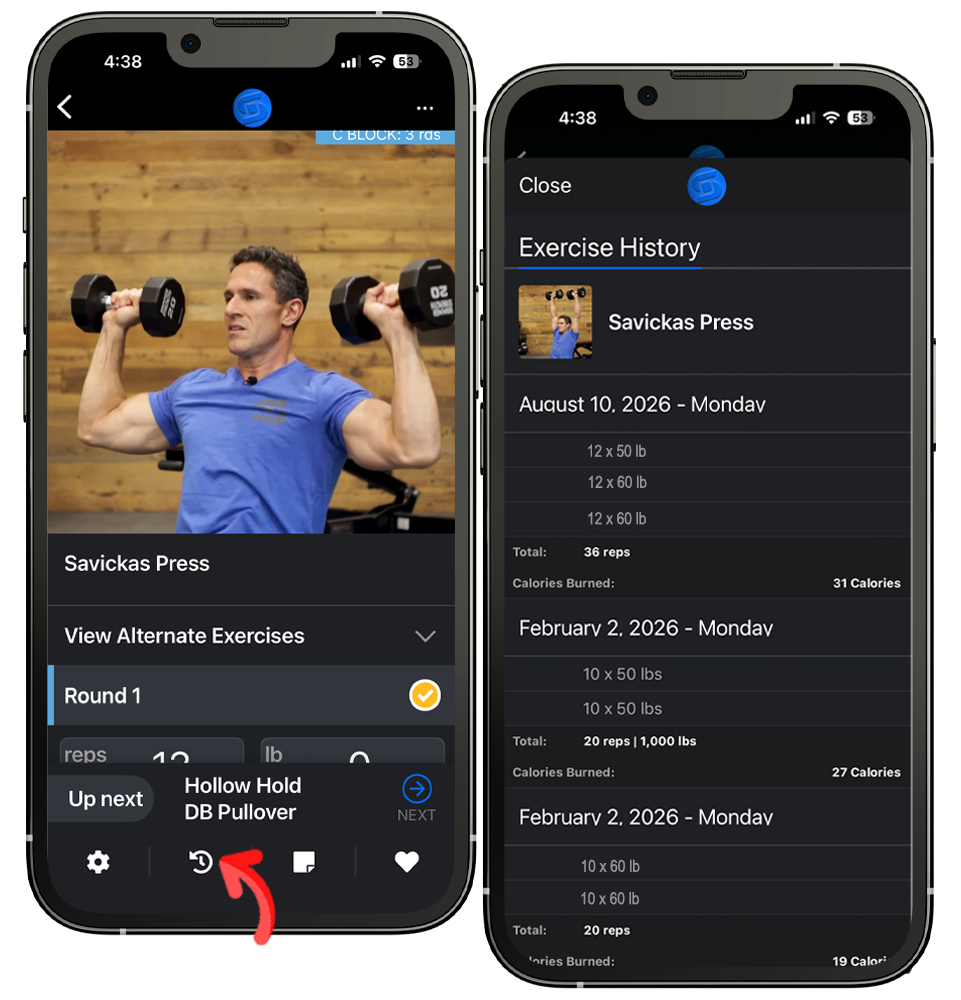
While logging your workout, tap the History Button ↺ (second icon in the footer), a pop-up screen will appear with your logging history for the exercise, tap Close in the upper left corner to return to logging.
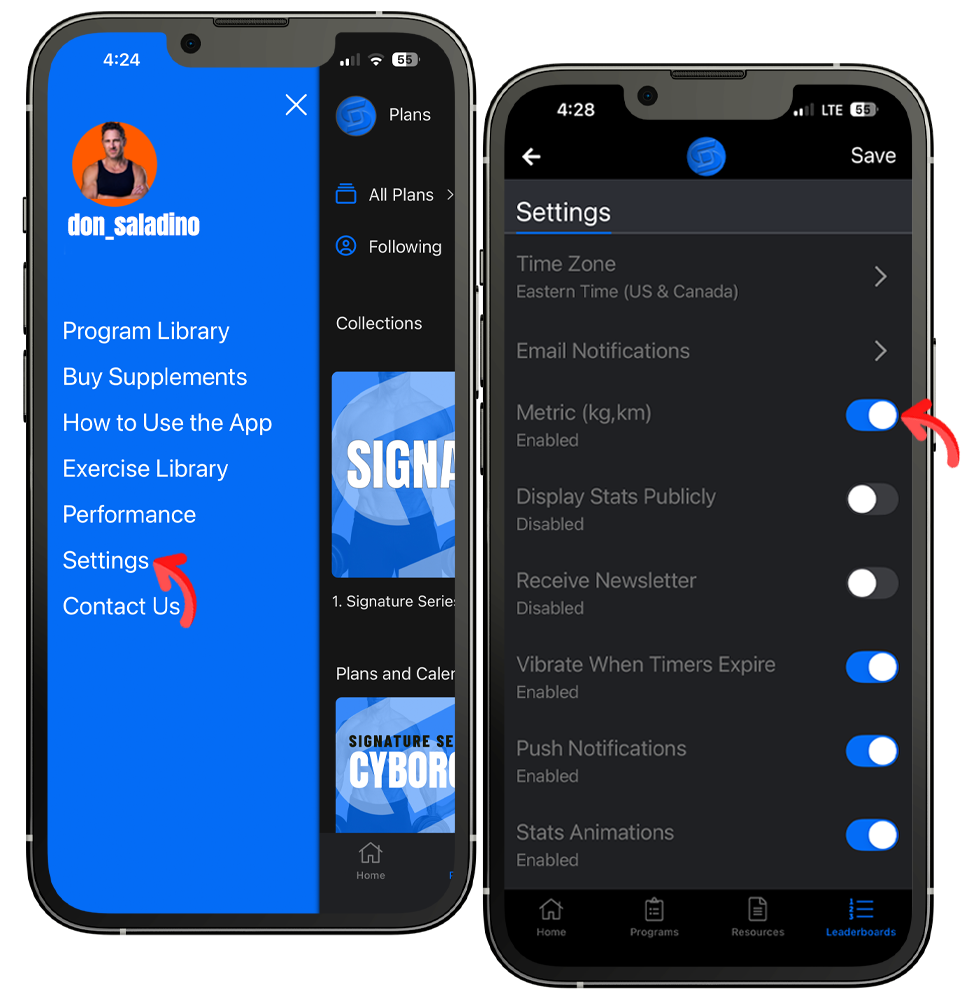
You can change from pounds to kilograms by tapping Settings in the sidebar, toggling the slider on for Metric, and tapping Save in the upper right corner.
PROGRAM LIBRARY
Your Membership includes 14 Program. Each program has a gym and dumbbell-only version.
-
Built around performance, power, hypertrophy, and muscle development. This is how Don trains himself, and now you can train the same way. The collection includes Train Like Don, Don's own training blueprint, and Cyborg, built around heavy, tempo-controlled main lifts for those who train like a machine, with new programs added every quarter.
TRAIN LIKE DON:
This is my own training blueprint. The exact style I use to build strength, power, and an athletic, performance-driven physique. It's not just a lifting program: speed and agility work, explosive power training, and conditioning are built directly into the week, the same way I like to train. Five days combine heavy strength work with athletic movement patterns: sprints, jumps, and power. So you're building muscle while also moving like an athlete.
Training Split:
Day 1. Chest + Cardio
Day 2. Arms + Speed
Day 3. Legs
|Day 4. Shoulders + Speed
Day 5. Back + HIIT
CYBORG:
Cyborg: someone who trains like a machine.
My training partner of 20 years gave me that nickname. Not because of one big lift or a number on a plate, but because of how I show up and do the work. A machine doesn't skip a day because it's tired. It doesn't need motivation. It just runs the program. This program is built around that same mindset, designed to build strength, power, and hypertrophy through heavy, tempo-controlled main lifts on the primary strength days, paired with core and conditioning work to round out a complete training week.
Training Split:
Day 1. Legs
Day 2. Push
Day 3. Pull
Day 4. Core + Cardio
Day 5. Full Circuit -
Built to turn your body into a fat burning furnace. These programs pair full-body strength work with high-volume circuits and dedicated core and cardio days, driving fat loss while still building and maintaining muscle. The collection includes Ignite Protocol, a full body complex and circuit-based program built to spark conditioning and keep your metabolism running, and Torched, a strength and conditioning hybrid built around tempo work and interval training. New programs are added to the collection every quarter.
Ignite Protocol is built to burn fat, build conditioning, and keep you moving. A training week that pairs full-body strength complexes with dedicated core and cardio work to drive fat loss without sacrificing muscle. Five days combine dumbbell complexes, strength circuits, and interval-based conditioning to keep your heart rate up and the results coming.
Training Split:
Day 1. Full Body Complex
Day 2. Core + Cardio
Day 3. Full Body Strength
Day 4. Core + Cardio
Day 5. Ignite Circuit
Torched is part of the Shred Series, built to burn fat and build conditioning fast. This training week pairs full-body strength work with dedicated core and cardio days to keep your metabolism working long after the session ends. Five days combine strength circuits, tempo-based finishers, and interval training to drive fat loss while still building muscle.
Training Split:
Day 1. Full Body Strength
Day 2. Core + Cardio
Day 3. Timed Full Body + Cardio
Day 4. Core + Cardio
Day 5. Full Body + Cardio -
Built for beginners and for anyone coming back to training after time off. This 12-week collection is broken into three progressive levels, four weeks each, so you build real strength and confidence one phase at a time. Level 1 teaches your body the fundamental movement patterns. Level 2 adds load and introduces rotational and side-to-side training. Level 3 brings in power and unilateral work to build balanced strength and athleticism. Whether this is your first time training or your first workout in years, Foundation Series meets you exactly where you are and builds you up from there.
Level 1 (Weeks 1-4) trains your full body every single session so your body can practice each movement pattern (squat, hinge, push, pull, and carry) multiple times a week and truly learn it. Short, focused workouts build consistency and momentum, with 10 minutes of Zone 2 cardio after every session to start building your engine.Level 2 (Weeks 5-8) build on the foundational movements into side-to-side and rotational training, while the loading goes up now that your patterns are locked in. Zone 2 cardio increases to 15 minutes, three days a week, building on the base you set in Level 1.
Level 3 (Weeks 9-12) brings in power movements and rotational work, along with more unilateral movements to build balanced strength and athleticism. Cardio shifts to 20 minutes twice a week, with higher-intensity interval work introduced now that your aerobic base is built.
No guesswork. Just a clear path from your first workout to feeling like a completely different version of yourself.
-
Built to deliver full, effective workouts in under 30 minutes, four days a week, so you can train hard and still get on with your day. Each 6-week program is built around efficient, high-value movement patterns that train the whole body without wasting a single minute in the gym.
FULL BODY EXPRESS is designed for people who want an effective workout without spending hours in the gym. These sessions train the entire body in one workout so you can build strength, improve conditioning, and stay consistent with your training. You'll train 4 days per week, hitting every major muscle group each session, combining lower body, upper body, and core movements so you get the most out of your time. Whether you're short on time or simply prefer full-body training, this program delivers efficient sessions that fit into a busy schedule.
Training Split:
Day 1. Full Body
Day 2. Full Body
Day 3. Full Body Circuit
Day 4. Full Body
UPPER / LOWER EXPRESS is designed for people who want a quick, effective workout. This program splits training into upper and lower body days so you can focus on specific muscle groups while still maintaining a balanced, full-body approach across the week. You'll train 4 days per week, alternating between lower and upper body sessions. Each workout is built around simple, effective movement patterns that help you build strength and move better. The structure allows you to train with intent while keeping workouts short and focused.
Training Split:
Day 1. Lower Body
Day 2. Upper Body
Day 3. Lower Body
Day 4. Upper Body -
The exact training programs Ryan Reynolds used to prep for his role as Deadpool, spanning three films and nearly a decade of transformation. Built for a lean, powerful, performance-driven physique, this closed trilogy fuses aesthetics with function, superhero style. Whether you're just starting out or already deep in the game, these three programs scale with your intensity
DEADPOOL 1 - The origin story starts here.
This is the exact training program Ryan Reynolds used to prep for the first Deadpool movie in 2014. Designed to build a lean, powerful, performance-driven physique, it fuses aesthetics with function, superhero style. A 5-day training schedule that scales with your intensity, whether you're just starting out or already deep in the game.
Training Split:
Day 1. Maximum Effort Legs
Day 2. Merc with the Pec
Day 3. Chimichanga Guns
Day 4. Back Attack
Day 5. Unicorn Strength: Shoulders & Abs
DEADPOOL 2 - The Next Level of the Trilogy
This is the program Ryan Reynolds used to prep for Deadpool 2, in 2017. It’s brutal, effective, and engineered for a performance physique that delivers both aesthetics and athleticism. A 6-day training schedule built for serious commitment. Each day is themed, fun, and brutally effective.
Training Split:
Day 1. Push (Pushing Dominos)
Day 2. Pull (Pull Yourself Together)
Day 3. Legs (Don't Skip Leg Day)
Day 4. Push Pump (The Juggernaut)
Day 5. Pull Pump (Cable's Arsenal)
Day 6. Leg Pump (Lower Body Carnage)
DEAPOOL 3 - The final chapter in the trilogy.
Designed to forge a performance-ready physique that hits hard, moves well, and looks like it belongs in a superhero suit. This is the 2023 plan that completed the trilogy. A 5-day training split hitting lower body and upper body twice per week ensures balanced development and sufficient volume for strength and hypertrophy, ideal for those looking to pack on size and power.
Training Split:
Day 1. Maximum Effort Lower Body
Day 2. Maximum Effort Upper Body
Day 3. Deadpool Guns, Core, + Cardio
Day 4. Extra Spicy Lower Body
Day 5. Extra Spicy Upper Body -
Built for training anywhere, using either just your bodyweight or a set of resistance bands. It includes Suit Up, a bodyweight-only program that builds strength and conditioning using nothing but your own body, and Banded, a resistance band program that builds strength and muscle without ever needing a gym. Whether you're at home, on the road, or just don't have access to equipment, this collection has you covered.
SUIT UP BODYWEIGHT - One of my Marvel clients coined that phrase while training for their role. Suiting up wasn't just putting on the costume, it was everything that came before it. The training. The discipline. The work nobody sees. The phrase stuck with me, and it became more than a training term. It became a mindset: prepare, work hard, get ready, so that when the moment comes, you're ready for it. No gym, no equipment, no excuses. This program is built entirely around bodyweight training, using your own body as the resistance to build strength, stability, and conditioning anywhere you are. Four days combine full-body strength work, high-volume circuits, and core-focused finishers, so you can train hard whether you're at home, on the road, or anywhere in between.
Training Split:
Day 1. Full Body Strength
Day 2. Survivor Circuit
Day 3. Full Body Circuits
Day 4. Optional Core + Cardio
BANDED - This program is built entirely around resistance bands, so you can train anywhere with minimal equipment. Three days combine full-body band work, functional strength patterns, and core stability training to build strength and muscle without needing any equipment, other than bands. You'll train through a mix of circuit-style full-body sessions and more structured strength days, hitting every major muscle group with squats, presses, rows, curls, and rotational core work.
Training Split:
Day 1. Survivor Circuit
Day 2. Full Body Strength
Day 3. Full Body Circuits -
Beyond the structured programs, this collection gives you standalone workouts to train alongside Don anytime, no plan required. Choose from Mobility, Abs + Core, Full Body, and Upper/Lower sessions, and jump into whichever one fits your day. Whether you're short on time, need a break between programs, or just want to move, these are grab-and-go workouts built to train with, not follow week to week.
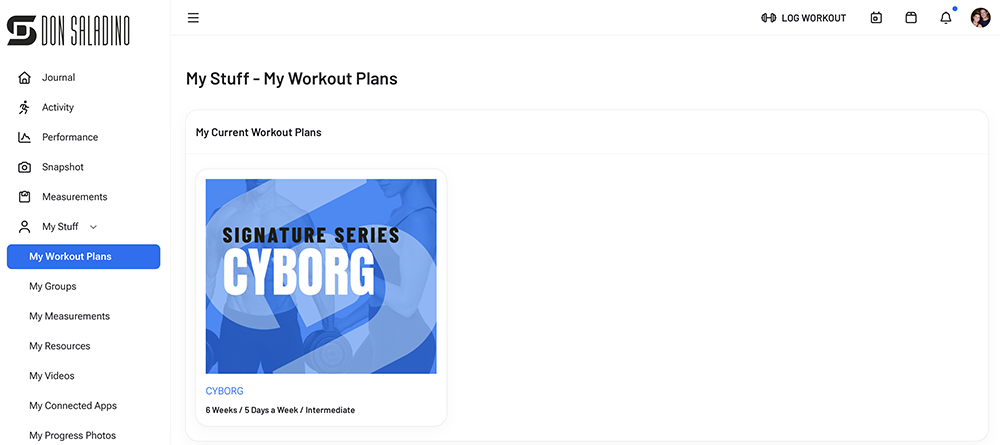
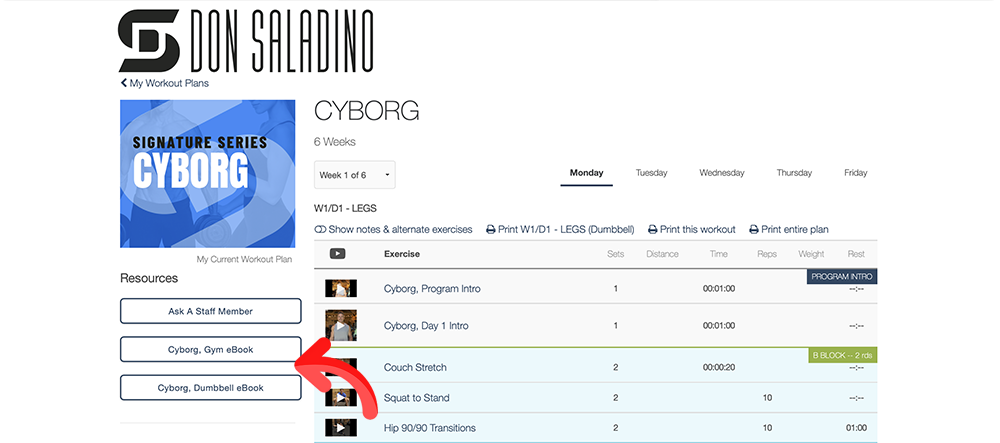
How to print an eBook:
1. Log in online @ app.donsaladino.com
2. Click My Stuff dropdown in the left column.
3. Click My Workout Plans. Select the plan.
4. Click the Resource in the left column you want to print.
5. In the toolbar, click File & then click Print.
To cancel your membership:
1. Log in online @ app.donsaladino.com
2. Click your account bubble in the upper right corner.
3. Click Billing Information.
4. Click Cancel Your Membership.
Sorry to see you go.
By design there is a lot included with the membership. If you are having a difficult time navigating through the options, I am happy to help pick your first program. Message me directly.
Quick Start Options:
+ New to training or coming back after time off? Start with Foundation, Level 1.
+ Want to burn fat/lose weight? Start with Ignite Protocol.
+ Want to build strength & power? Start with Cyborg.
+ Want fast & effective training? Start with Express Full Body.
Available Programs: https://www.donsaladino.com/program-library